Samsung B310E Charging Paused Problem Repair Solution
Samsung SM-B310E Not Charging Solution Charging Ways Jumper Charging Paused Battery Temperature Low Or High
Samsung Guru Music 2 B310E charging paused problem is known to be the most common one, and this is mainly because of the fact that a little bit of physical damage or water damage to the charging connector pin is enough to trouble with your phone’s charging connector. However there could also be other reasons of this problem like a faulty charger or phone’s battery.
Problems
- Not charging.
- N7000 heats up during charging.
- No response when charger is connected.
Reasons of Problems
- Charger might be faulty.
- Charging connector / pin might be faulty or is dirty.
- Charging dock strip is faulty.
- Phone might be water damaged, hence damaging the charging dock / charging pin.
- There are also chances that phone’s battery might be faulty.
- Uneven voltage at different points on charging dock.
- Any of the components or capacitors might be damaged or short.
- Power IC could also be faulty, hence forbidding your Samsung Galaxy Note N7000 to get any charge.
- Battery pins could be rusty or damaged.
Hardware Solution:
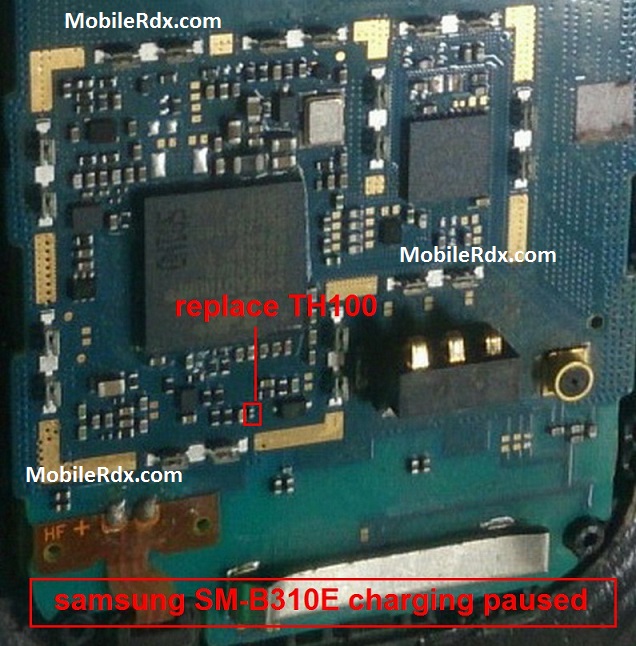
In order to overcome water damage problem, all you have to do is to:
Clean charging dock strip and check.
If the problem persists or if the pins are damaged then you need to replace the entire charging dock strip.
Now check the voltage of 1st pin (from right) of charging connector with the help of a Multi-Meter, if there is a problem then re-solder charging pin.
Now check voltage at capacitor, if it is zero then check whether it is short or not, if it is then change the capacitor. If not then:
Check the connection between charging pin and Capacitor, if the connection is broken re-solder it or place a jumper.
Charge is provided to the Samsung B310E board via Capacitor.
If you have further Questions please leave a comment.
Note: Please note that even though every solution posted on our website is tested by one or more members of our team before posting, but still we do not take any responsibility for any damage it may cause to your cell phones. Use these repairing solutions at your own risk. Thank You.